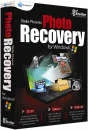
Retrieve your files no matter how they were lost, or where they were stored, or why they are lost using Stellar Phoenix Photo Recovery for Windows.
Stellar Phoenix Photo Recovery for Windows is your first choice DIY solution when it comes to the recovery of your precious multimedia files. This essential program comprehensively scans your chosen devise to retrieve multimedia data lost as a result of accidental deletion/formatting, system malfunctions or even defective storage devises.
Its easy-to-use, wizard driven interface makes the whole process of retrieving lost files quick and effective. You can even choose the storage media devise you wish to recover files from, including external hard drive, memory cards, USB drives and many more.
Designed for Windows 7, Vista, 2003, XP and 2000 operating systems, this unique program supports file retrieval from all the major image file formats including, DNG, JPEG, PNG, BMP, TIF, TIFF, GIF, RAW, JP2, INDD and PSD. Plus, the ability to be able to perform image recovery from a variety of memory cards including, SD, MMC, MMCmicro, SM, CF and flash cards. You will simply never need another multimedia recovery solution.
The program is fully interactive and provides several options of retrieval. You will be guided throughout the recovery process and easy-to-understand tabs will make it simple to identify which recovery related activity you wish to activate. The tabs include 'Data Recovery', 'Resume Recovery' and 'Create Image'. With an easy-to-use wizard driven interface, you can quickly recover lost multimedia files in just 3 simple steps:
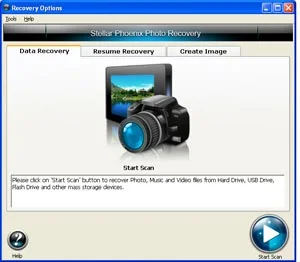
Scan: The program runs a thorough scan of your media devise that contains the lost multimedia files. This could include a Mac hard drive, digital camera, memory card or one of many more.
Select: Once the scan is completed Photo Recovery provides a clear list of recoverable files, for you to select the ones you wish to restore.
Restore: Finally click the recover button to restore your precious files. Subsequently you can then save these files to a user defined location.
Key Functions promote retrieving multimedia files more efficiently:
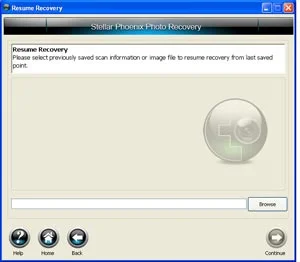
Resume Recovery Tab: When a scan has been performed and saved, the Resume Recovery option allows you to recover data from that saved scan file at a later time.
Create Image Tab: Intelligent feature used to take an image of the hard disk or selected drives. The image is then stored in a single file which contains all the information of the 'imaged' area.
This image can then be used to speed up the recovery of multimedia data when a system crashes.
Why Choose Stellar Phoenix Photo Recovery for Windows:
1. 'Do It Yourself' Recovery Solution: No sending away your hard drive or replying on any other service provider.
2. Supports Recovery from all Major Camera Brands: Including, Nikon, Canon, Sony, etc.
3. Supports Recovery from a Host of Popular Storage Devises: Including, external hard drives, Mac laptops, iPod's, memory cards, CD's, DVD's and more.
4. Easy-To-Use: Simple to follow wizard driven interface. No technical skill required.
5. Developed by a Market Leader in Data Recovery: Stellar Phoenix has over 1,000,000 satisfied customers across 137 countries.
All Customer Reviews
There are currently no reviews.